BlenderKit in Godot 🔗
Ever dreamed of using BlenderKit in Godot Engine? Now you can!
Browse the BlenderKit gallery, click Send to Godot on any asset, and let it land directly in your Godot project — organized and ready to use.
Our free and open-source add-on is in its alpha stage (view GitHub repo). Please experiment and share your thoughts.
Requirements 🔗
- Godot Engine 4.X
- OS: Linux, Windows, macOS
- Architectures: x86_64, arm64
- Web browser permission to access local network (to connect to BlenderKit Client)
How to install 🔗
- Go to GitHub Releases and download
blenderkit-godot-vX.Y.Z.zip - Unzip the archive into the folder that contains your
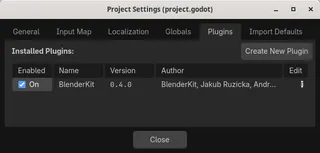
project.godotfile. - Open Project Settings in the Godot Editor menu bar, go to Project → Project Settings, and click the Plugins tab.
- Find BlenderKit in the plugin list and check the Enabled checkbox.
- A new BlenderKit tab will appear in the right dock panel next to Inspector. BlenderKit messages will appear in Output.
How to use 🔗
- Locate the BlenderKit tab in the right dock panel alongside Inspector. You might need to use top-right arrows (◀️▶️) to find it amongst other panels.
- If there is a green checkmark and a Connected text, all is good on the Plugin and Client side. If not, see Troubleshooting.
- Open BlenderKit.com in your web browser using the Browse Assets button or otherwise and browse the asset gallery.
- On any asset page, click the Get this model link. Then, on Get the model page, click the Send to Godot button which should appear shortly.
- The BlenderKit Client should download the asset into
bk_assets/(or whatever you set up) in your Godot project root, organized by type (models, materials, etc.). You can click the Download in BlenderKit tab to copy its filepath into clipboard.
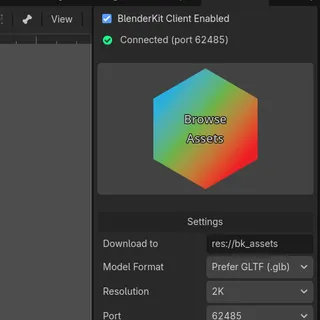
BlenderKit tab in Godot's right dock
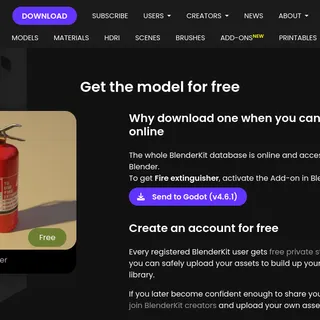
Send to Godot button on BlenderKit Get the model page
Can’t find the button? 🔗
The Send to Godot button is fickle and elusive as the browser or OS may decide to block the connection to the local BlenderKit Client for security and other reasons.
If the button doesn't appear, try:
- Having Godot window focused and visible alongside your browser
- Hard reloading the webpage
- Updating your OS/browser (esp. Windows 11 with random breakages)
- Another browser (Firefox worked on any OS so far)
- Troubleshooting
Troubleshooting 🔗
Check existing issues: Browse GitHub Issues to see if your problem has already been reported or resolved.
Open a new issue: If nothing matches, open a new issue and describe what happened, your OS, Godot version, and any error output.
Contact us: If needed, email us for help.
Enjoy!